Unlocking the Power of Crossplane: How Crossview Became the Essential Dashboard for Modern Infrastructure Teams crossview-crossplane
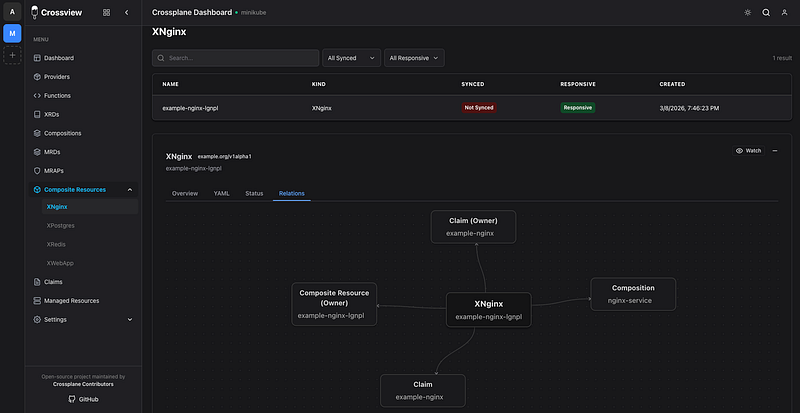
There is a moment every platform engineer knows well. You apply a Crossplane claim, watch it disappear into the cluster, and then spend the next twenty minutes running kubectl commands, staring at raw YAML, and trying to mentally reconstruct what is actually happening to your infrastructure mentally mentally. Is the composite resource provisioning? Did the managed resource fail? Which provider is misbehaving? The answers are all there, scattered across a dozen outputs, but the picture never quite comes together.
That frustration is exactly where Crossview was born.
The Problem We Were Solving
Crossplane is a remarkable project. It extends Kubernetes to let platform teams compose cloud infrastructure from any provider using the same declarative model they already know. The ideas behind it are genuinely powerful: Claims, Composite Resources, Compositions, XRDs, Providers. But as the infrastructure grows, the mental overhead of tracking all of it through the command line becomes unsustainable.
The pain points were consistent and predictable:
- New team members struggled to understand what was connected to what
- Debugging a failing composite resource became a multi-step archaeology exercise
- Getting a health overview of an entire infrastructure required memorized commands, not intuition
- Simple questions like “why is this composite not ready?” required jumping between five different kubectl outputs
Generic Kubernetes dashboards do not help much here either. They show pods, deployments, and services, but they have no concept of Crossplane’s resource model. They do not know the difference between a claim and a managed resource. They cannot show the relationship between a Composition and the cloud resources it produces. For Crossplane users, those dashboards are like reading a map of a different city.
I wanted something that understood Crossplane the way Crossplane engineers think about it. Something that spoke the same language. That is what I set out to build.
How It Started
The earliest version of Crossview was a personal tool. It started as a React frontend wired up to a simple proxy that talked to the Kubernetes API. The goal was modest: just give me a page where I can see my providers, my XRDs, my compositions, and their health status without running five commands.
But once I started using it day to day, the value became obvious immediately. Context switching dropped. Onboarding new team members became faster because they could actually see the infrastructure tree instead of having to imagine it from YAML. Debugging got faster because the relationship between resources was visible at a glance rather than inferred from multiple command outputs.
I decided to open-source it and share it with the Crossplane community.
What happened next was genuinely unexpected.
The Community Response and Becoming an Official Project
The Crossplane community picked it up faster than I anticipated. Platform engineers started filing issues, suggesting features, and contributing code. The repository moved from a personal experiment to a project that people were running in production. Stars accumulated. Slack conversations happened. The questions people asked in issues told me what mattered most to them: real-time status updates, multi-cluster support, authentication integration, and performance at scale.
The project also gained early traction on Hacker News when the move to crossplane-contrib was announced. Engineers there highlighted the value of having a purpose-built Crossplane UI as opposed to adapting generic tooling, and that conversation brought in a wave of new contributors and early adopters.
The turning point came when the Crossplane maintainers and the crossplane-contrib organization took notice. Crossview was accepted as an extension project of Crossplane and moved under the crossplane-contrib GitHub organization, which is the official home for community-driven extensions to the Crossplane ecosystem. This is not a trivial thing. The crossplane-contrib umbrella carries the signal that a project has been vetted and recognized as a meaningful addition to the Crossplane world. It means Crossview is not a third-party workaround but a legitimate part of how the community chooses to operate and observe Crossplane infrastructure.
The project now lives at github.com/crossplane-contrib/crossview, carries the Crossplane community’s backing as the standard UI dashboard for the ecosystem, and ships its Helm chart as an OCI artifact directly from the crossplane-contrib GitHub Container Registry.
What Makes Crossview Different
The most important thing to understand about Crossview is that it was designed from day one for Crossplane specifically, not adapted from a general-purpose Kubernetes dashboard.
Crossplane-Native Resource Model
When you open Crossview, you are not looking at a generic resource browser with Crossplane resources listed somewhere in the middle. You are looking at a dashboard that understands providers, XRDs, compositions, composite resources, managed resources, and claims as first-class concepts. The views are shaped around the questions Crossplane engineers actually ask:
- What is the health of my providers?
- Which claims are ready and which are not?
- What managed resources did this composition create?
- What events are attached to this failing resource?
Crossview vs. Generic Kubernetes Dashboards
| Capability | Generic K8s Dashboard | Crossview | | --- | --- | --- | | Crossplane resource awareness | No | Yes | | Claim to managed resource tracing | No | Yes | | Provider health visibility | Generic only | Dedicated view | | Composition and XRD browsing | Not supported | First-class | | Real-time via Informers + WebSocket | Varies | Yes | | Multi-cluster context switching | Limited | Built-in | | OIDC and SAML SSO | Varies | Built-in | | Database-free auth mode | N/A | Supported | | Open source, zero licensing cost | Varies | Always free |
Real-Time Updates Without API Hammering
Rather than polling the Kubernetes API server at an interval, Crossview uses Kubernetes Informers on the backend. Informers establish a watch stream with the API server and receive change events the moment they happen. Those events are forwarded to connected browser sessions over WebSocket. When a managed resource transitions from False to True on its Ready condition, you see it happen in the dashboard immediately, without refreshing or waiting for a polling cycle.
Enterprise Authentication
Crossview ships with three authentication modes, giving teams flexibility to match their security posture:
- session: Username/password or SSO via OIDC/SAML. Identity is stored in a PostgreSQL-backed session. Compatible with Auth0, Okta, Azure AD, Keycloak, and any compliant identity provider.
- header: Trust an identity injected by an upstream proxy such as OAuth2 Proxy or an ingress-level auth controller. No login form, no database required. Ideal for teams already operating an auth layer in front of their internal tooling.
- none: No authentication. Suitable for local development or fully trusted private networks.
The database is only required when running in session mode. For header and none modes, the deployment footprint is smaller and the configuration is simpler.
The Technical Architecture
Tech Stack
Frontend
| Component | Technology | | --- | --- | | UI Framework | React | | Build Tool | Vite | | Component Library | Chakra UI | | Routing | React Router | | Real-time | WebSocket |
Backend
| Component | Technology | | --- | --- | | Language | Go 1.24+ | | Web Framework | Gin | | Kubernetes Client | client-go | | Resource Watching | Kubernetes Informers | | Database ORM | GORM | | Database | PostgreSQL |
Repository Structure
The repository is organized clearly to separate concerns and make every piece of the system findable:
crossview/
├── src/                    # React frontend application
├── crossview-go-server/    # Go backend (API + WebSocket server)
├── helm/crossview/         # Helm chart for Kubernetes deployment
├── k8s/                    # Raw Kubernetes manifests
├── docs/                   # Full documentation set
├── nginx/                  # Nginx configuration examples
├── keycloak/               # Keycloak SSO integration guide
├── config/                 # Application configuration files
├── scripts/                # Utility and release scripts
├── Dockerfile              # Production image definition
└── docker-compose.yml      # Local full-stack environment
Backend API Surface
The Go backend listens on port 3001 and exposes the following REST endpoints alongside a WebSocket stream:
GET  /api/health                         Health check and Kubernetes connection status
GET  /api/contexts                       List all available Kubernetes contexts
GET  /api/contexts/current               Get the active context
POST /api/contexts/current               Switch the active context
GET  /api/resources?apiVersion=&kind=    List resources by type, namespace, and context
GET  /api/resource?kind=&name=           Get a single resource by identity
GET  /api/events?kind=&name=             Get Kubernetes events for a resource
GET  /api/managed?context=               List all managed resources
GET  /api/watch                          WebSocket: real-time resource event stream
POST /api/auth/login                     Authenticate a session
POST /api/auth/logout                    Invalidate a session
GET  /api/auth/check                     Verify authentication status
How the Backend Detects Its Environment
One of the more practical decisions in the architecture is how the backend resolves its Kubernetes connection. It checks its runtime environment and chooses accordingly:
- Inside a Kubernetes pod: Automatically uses the mounted service account token at
/var/run/secrets/kubernetes.io/serviceaccount/. No kubeconfig file needed. - Running locally: Reads from
~/.kube/configby default, or from the path specified in theKUBECONFIGenvironment variable.
This means the same binary and the same Docker image run correctly in both local development and production Kubernetes without any code-level branching or build flags.
Production Build Flow
In development, the Vite frontend runs on port 5173 and proxies all /api requests to the Go backend at port 3001. In production, the Go backend serves the compiled static frontend from the dist/ folder alongside the API, so everything is available on a single port. The Dockerfile captures this precisely:
dockerfile
# Stage 1: Build frontend
FROM node:20-alpine AS frontend-builder
WORKDIR /app
COPY package*.json ./
RUN npm install
COPY . .
RUN npm run build

# Stage 2: Build backend
FROM golang:1.24-alpine AS backend-builder
WORKDIR /app/crossview-go-server
COPY crossview-go-server/ .
RUN go build -o crossview main.go

# Stage 3: Final image
FROM alpine:latest
WORKDIR /app
COPY --from=backend-builder /app/crossview-go-server/crossview .
COPY --from=frontend-builder /app/dist ./dist
EXPOSE 3001
CMD ["./crossview", "app:serve"]
Deployment Across Environments
Crossview is designed to follow infrastructure through every stage of its lifecycle, from a developer's laptop to a multi-cluster production environment.
Local Development
Getting Crossview running locally against an existing cluster takes under five minutes with Node.js 20 and Go 1.24 installed.
Terminal 1: Frontend
bash
npm install
npm run dev
Terminal 2: Backend
bash
cd crossview-go-server
go run main.go app:serve
The application is available at http://localhost:5173. The frontend proxies all API calls to the backend at http://localhost:3001. The backend picks up your existing kubeconfig automatically.
Configuration is loaded from config/config.yaml, but environment variables take precedence if set:
bash
export DB_HOST=localhost
export DB_PORT=8920
export DB_NAME=crossview
export DB_USER=postgres
export DB_PASSWORD=your-password
Docker Compose
For a complete local stack including the PostgreSQL database:
yaml
services:
  crossview:
    build: .
    ports:
      - "3001:3001"
    environment:
      - DB_HOST=postgres
      - DB_PORT=5432
      - DB_NAME=crossview
      - DB_USER=postgres
      - DB_PASSWORD=password
      - KUBECONFIG=/app/.kube/config
      - SESSION_SECRET=your-secret-key-here
    volumes:
      - ~/.kube/config:/app/.kube/config:ro
    depends_on:
      - postgres

  postgres:
    image: postgres:latest
    environment:
      - POSTGRES_DB=crossview
      - POSTGRES_USER=postgres
      - POSTGRES_PASSWORD=password
    ports:
      - "8920:5432"
bash
docker-compose upKubernetes with Helm (Recommended for Staging and Production)
The Helm chart is published to Artifact Hub and also available as an OCI artifact from the GitHub Container Registry. There are three ways to install it.
Option 1: From the Helm repository
bash
helm repo add crossview https://crossplane-contrib.github.io/crossview
helm repo update

helm install crossview crossview/crossview \
  --namespace crossview \
  --create-namespace \
  --set secrets.dbPassword=your-db-password \
  --set secrets.sessionSecret=$(openssl rand -base64 32)
Option 2: From the OCI registry (no repository setup needed)
bash
helm install crossview oci://ghcr.io/crossplane-contrib/charts/crossview \
  --version 3.8.0 \
  --namespace crossview \
  --create-namespace \
  --set secrets.dbPassword=your-db-password \
  --set secrets.sessionSecret=$(openssl rand -base64 32)
Option 3: With ingress and SSO for production
bash
helm install crossview crossview/crossview \
  --namespace crossview \
  --create-namespace \
  --set image.tag=3.8.0 \
  --set app.replicas=2 \
  --set secrets.dbPassword=your-db-password \
  --set secrets.sessionSecret=$(openssl rand -base64 32) \
  --set ingress.enabled=true \
  --set ingress.hosts[0].host=crossview.example.com \
  --set server.auth.mode=session
Configuration Priority
The application resolves configuration in the following order, with higher-priority sources overriding lower ones:
| Priority | Source | Example |
| --- | --- | --- |
| 1 (Highest) | Environment variables | DB_HOST, DB_PASSWORD |
| 2 | Config file | config/config.yaml |
| 3 (Lowest) | Built-in defaults | Port 5432, localhost |
Deployment Summary by Stage
| Stage | Recommended Method | Auth Mode | Database Needed |
| --- | --- | --- | --- |
| Local development | npm run dev + go run | none | No |
| Integration testing | Docker Compose | none or header | Optional |
| Staging (shared team) | Helm chart | header or session | If session |
| Production | Helm chart with OCI | session or header | If session |
| Air-gapped production | Raw k8s manifests | header | If session |
What It Does for Team Productivity
The productivity gains from Crossview come from reducing cognitive overhead at several specific points in the daily workflow of a platform engineering team.
Debugging Time
When something is wrong with a Crossplane resource, the first question is always "what state is it in and why?" With kubectl alone, answering that question means running kubectl describe, kubectl get events, and multiple kubectl get commands across namespaces, then mentally connecting the output. With Crossview, you open the resource and see its status conditions, its events, and its relationships in a single view. The mean time to understanding drops significantly.
Onboarding
Crossplane has a steep conceptual learning curve. Claims, composite resources, compositions, XRDs, and providers are powerful abstractions, but they are also abstract until you can see them in action. New team members who can browse live infrastructure in Crossview develop intuition faster than those who only have documentation and command-line output. When you can see that this claim produced that composite resource which is managing those cloud resources, the mental model clicks into place much more naturally.
Platform Transparency
When application teams consume a platform built on Crossplane, they often want visibility into the state of the infrastructure they depend on without needing deep Kubernetes expertise. Crossview can serve as that window, giving platform consumers enough information to understand what is running without exposing implementation details they do not need.
Operational Confidence
Real-time watching means you do not need to periodically re-run commands to verify that a provisioning operation completed. You can watch it happen. When a team member applies a claim in one terminal, the rest of the team can watch the managed resource move through its lifecycle in the dashboard in real time. That shared observability changes how teams coordinate during deployments.
The Road Ahead
The project has now released over 30 versions since its inception. Version 3.8.0, the latest as of April 2026, shipped a meaningful reliability improvement: graceful handling of missing Kubernetes API resources. Rather than propagating a 500 error when the API server reports that a resource type does not exist (which happens in environments where certain Crossplane Functions are not installed), the backend now classifies that condition specifically using a dedicated IsMissingKubernetesResourceError helper and returns an empty result with a 200 status. This kind of change reflects a project that has moved from proving the concept to hardening for real production environments.
The 3.6.0 release brought the authentication mode flexibility described earlier, including header-based auth that eliminates the database requirement for teams that already operate an identity proxy. It also marked the official migration of the project repository and Helm chart artifacts to the crossplane-contrib organization, cementing Crossview's standing as an official part of the Crossplane ecosystem.
The roadmap ahead is shaped by the community through GitHub Discussions and the open issue backlog. The contributor base has grown steadily, with engineers from across the Crossplane community submitting pull requests, reviewing code, and helping maintain the codebase.
There is a dedicated Slack workspace where the community gathers to discuss the project, share deployment patterns, and help each other with configuration questions. The invite link is in the repository README.
An Honest Reflection
Building Crossview has taught me something I did not fully expect: open-source projects that solve real pain points grow in ways their creators cannot plan for. I built the first version to scratch my own itch. I open-sourced it because I thought others might find it useful. I did not anticipate it becoming the official dashboard for the Crossplane ecosystem.
That trajectory happened because the problem was real and widely shared. Every Crossplane engineer who has ever stared at a kubectl describe output that gave them half the information they needed understood immediately what Crossview was trying to do. The tool did not need to be explained. It needed to be seen.
If you are running Crossplane in any environment and you are not yet using Crossview, give it twenty minutes. The quickest path is:
bash
# Add the Helm repo
helm repo add crossview https://crossplane-contrib.github.io/crossview
helm repo update

# Install into your cluster
helm install crossview crossview/crossview \
  --namespace crossview \
  --create-namespace \
  --set secrets.dbPassword=yourpassword \
  --set secrets.sessionSecret=$(openssl rand -base64 32)
Or pull the OCI chart directly:
bash
helm install crossview oci://ghcr.io/crossplane-contrib/charts/crossview \
  --version 3.8.0 \
  --namespace crossview \
  --create-namespace
See what your infrastructure looks like when you can actually see it.
The repository is at github.com/crossplane-contrib/crossview. The Helm chart is on Artifact Hub at artifacthub.io/packages/helm/crossview/crossview. The documentation covers everything from a five-minute local setup to a full enterprise deployment with SSO and air-gapped environments. Contributions are always welcome, whether that is a feature request, a bug report, a pull request, or a star on the repository.
The goal was always simple: make Crossplane infrastructure visible, understandable, and easier to operate. We are well on our way.